No Flash is Better
Notice: Undefined variable: read_more in /home/scottp12/public_html/wp-content/themes/traction/archive.php on line 34
When taking photos at night your camera will automatically pop-up the flash and generate a powerful beam of light that will light up your immediate surroundings. This is great for close-up situations and for capturing those precious moments that you don’t have long to get.
However, the flash can be useless and thus spoiling your photograph when shooting from a longer distance or trying to capture a nicely lit building. The camera will shoot with a faster shutter speed when the flash is fired, this because it is relying on the flash’s light, but sometimes your camera isn’t that clever.
So the first thing to do is to get out of the auto mode and simply turn the Automatic Flash off. If you have the option of Shutter Priority than set your camera to that, otherwise just use the No-Flash mode.

No Flash
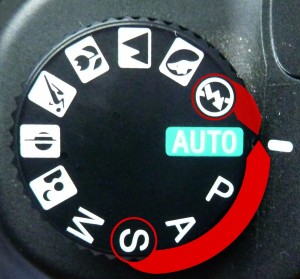
Mode Dial (Sony DSLR)
Depth of Field & Aperture Explained
Notice: Undefined variable: read_more in /home/scottp12/public_html/wp-content/themes/traction/archive.php on line 34
You may never have thought that the aperture or the diameter of the Iris in your camera is not only for controlling the amount of light that passes through to your sensor or film, but how you control your Depth of Field (D.O.F) in your photos.

Smaller Aperture = Larger D.O.F
Make money from your photos – Resources
Notice: Undefined variable: read_more in /home/scottp12/public_html/wp-content/themes/traction/archive.php on line 34
Here is a list of the Stock Photography websites where you can make money from your stock photographs:


Logo Tutorial Video
Notice: Undefined variable: read_more in /home/scottp12/public_html/wp-content/themes/traction/archive.php on line 34
Here’s a video tutorial of the Logo tut: https://www.scottphotographics.com/logo-tutorial/
Product: